Deploying a stateful database like PostgreSQL in Kubernetes represents a significant operational shift, but the payoff is substantial: a unified, declarative infrastructure managed through a single API. This integration streamlines operations and embeds your database directly into your CI/CD pipelines, treating it as a first-class citizen alongside your stateless applications. The goal is to bridge the traditional gap between development and database administration.
Why Run a Database in Kubernetes
The concept of running a stateful workload like PostgreSQL within the historically stateless ecosystem of Kubernetes can initially seem counterintuitive. For years, the prevailing wisdom dictated physical or logical separation for databases, often placing them on dedicated virtual machines or utilizing managed services to isolate their unique performance profiles and data integrity requirements from ephemeral application pods.
However, the Kubernetes ecosystem has matured significantly. It is no longer a hostile environment for stateful applications. The platform now offers robust, production-grade primitives and controllers specifically engineered to manage databases with the high degree of reliability they demand. The conversation has evolved from "Is this possible?" to "What is the most effective way to implement this?"
Unifying Your Infrastructure
The primary advantage of this approach is infrastructure unification. By bringing PostgreSQL under the same control plane as your microservices, you establish a consistent operational model for your entire technology stack. This eliminates context-switching and reduces operational friction.
- Declarative Management: You define your database's desired state—including version, configuration parameters, replica count, and resource allocation—within a YAML manifest. Kubernetes' control loop then works continuously to reconcile the cluster's actual state with your declared specification.
- Simplified Operations: Your operations team can leverage a consistent toolchain and workflow (
kubectl, Helm, GitOps) for all components, from a stateless frontend service to your mission-critical stateful database. - Consistent CI/CD Integration: The database becomes a standard component in your delivery pipeline. Schema migrations, version upgrades, and configuration adjustments can be automated, version-controlled, and deployed with the same rigor as your application code.
This unified model breaks down the operational silos that often separate developers and DBAs. When evaluating this approach, it is useful to compare it against managed cloud database services like RDS Relational Database Service to fully understand the trade-offs between granular control and managed convenience.
The Power of Kubernetes Primitives
Modern Kubernetes provides the foundational components required to run dependable, production-ready databases. Features once considered experimental are now core to production architectures for organizations worldwide.
By leveraging mature Kubernetes features, you transform database management from a manual, bespoke process into an automated, scalable, and repeatable discipline. This shift is fundamental to achieving true DevOps agility.
We are referring to constructs like StatefulSets, which provide pods with stable network identities (e.g., pgsql-0, pgsql-1) and ordered, predictable lifecycles for deployment and scaling. Persistent Volumes (PVs) and Persistent Volume Claims (PVCs) abstract storage from pod lifecycles, ensuring data survives restarts and rescheduling events.
The most transformative development, however, has been the Operator pattern. This is now the de facto standard for managing complex stateful applications. An operator is an application-specific controller that encodes domain-specific operational knowledge into software. For PostgreSQL, it acts as an automated DBA, managing complex tasks like backups, failovers, and version upgrades programmatically, thereby increasing system resilience and reducing the potential for human error.
Choosing Your Deployment Strategy
When you decide to run PostgreSQL in Kubernetes, you arrive at a critical fork in the road. The path you choose here will fundamentally shape your operational experience, influencing everything from daily management to how you handle emergencies. This isn't just a technical choice; it's a strategic decision about how your team will interact with your database.
The two primary routes are leveraging a Kubernetes Operator or taking the manual approach with StatefulSets. Think of an Operator as hiring a seasoned, automated DBA that lives inside your cluster, while managing StatefulSets directly is like becoming that DBA yourself.
The Operator Advantage: Automation and Expertise
A Kubernetes Operator is a specialized controller that extends the Kubernetes API to manage complex, stateful applications. For PostgreSQL, operators like CloudNativePG act as an automated expert, codifying years of database administration knowledge directly into your cluster's control loop.
Instead of manually piecing together replication, backups, and failover, you simply declare your desired state in a custom resource definition (CRD). The Operator does the rest.
- Automated Lifecycle Management: The Operator handles the heavy lifting of cluster provisioning, high-availability setup, and rolling updates with minimal human intervention.
- Built-in Day-2 Operations: It automates critical but tedious jobs such as backups to object storage, point-in-time recovery (PITR), and even connection pooling.
- Intelligent Failover: When a primary instance fails, the Operator automatically detects the problem, promotes the most up-to-date replica, and reconfigures the cluster to restore service. It’s the kind of logic you’d otherwise have to build yourself.
The trend towards this model is clear. PostgreSQL's adoption within Kubernetes has accelerated dramatically, with the CloudNativePG operator surpassing 4,300 GitHub stars and showing the fastest-growing adoption rate among its peers. In fact, its usage has tripled PostgreSQL adoption rates in Kubernetes deployments across hundreds of OpenShift clusters since its open-source launch.
This decision tree helps visualize where an Operator fits into the broader strategy.
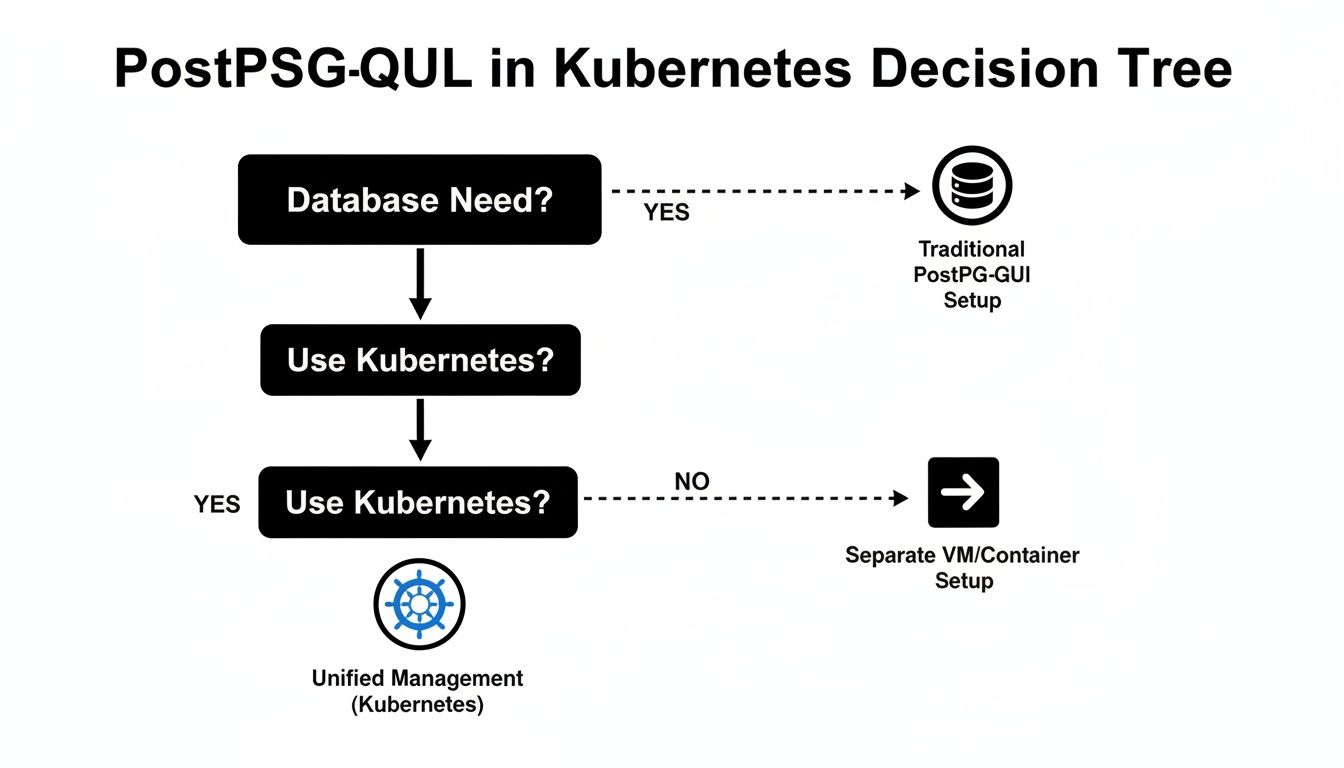
As you can see, once you commit to running a database inside Kubernetes, the goal becomes unified management—which is exactly what an Operator is designed to provide.
Manual StatefulSet Management: The Path to Total Control
The alternative is to build your PostgreSQL deployment from the ground up using Kubernetes primitives, with StatefulSets as the foundation. StatefulSets provide the essential guarantees for any stateful workload: stable network identifiers and persistent storage.
This approach gives you ultimate, granular control over every single component. You hand-craft the configuration for storage, networking, replication logic, and backup scripts.
Opting for manual StatefulSet management means you are responsible for embedding all the operational logic yourself. It offers maximum flexibility but requires deep expertise in both PostgreSQL and Kubernetes internals.
While this path provides absolute control, it also means you are solely responsible for implementing the high-availability and disaster recovery mechanisms that an Operator provides out of the box. You'll need to configure external tools like Patroni for failover management and write your own backup jobs from scratch. To dig deeper into this topic, check out our guide on Kubernetes deployment strategies for more context.
Comparing Deployment Strategies Head-to-Head
So, which path is right for you? The answer really depends on your team's skills, operational goals, and the level of risk you're willing to accept. One team might value the speed and reliability of an Operator, while another might require the specific, fine-tuned control of a manual setup.
To make it clearer, here’s a direct comparison of the two approaches across key operational areas.
PostgreSQL Deployment Strategy Comparison
This table breaks down the practical differences you'll face when choosing between an Operator and managing StatefulSets directly for your PostgreSQL clusters.
| Feature | Kubernetes Operator (e.g., CloudNativePG) | Manual StatefulSet Management |
|---|---|---|
| High Availability | Automated failover, leader election, and cluster healing are built-in. | Requires external tools (e.g., Patroni) and significant custom scripting. |
| Backups & Recovery | Declarative, scheduled backups to object storage; simplified PITR. | Manual setup of backup scripts (e.g., pg_dump, pg_basebackup) and cron jobs. |
| Upgrades | Automated rolling updates for minor versions and managed major upgrades. | A complex, manual process requiring careful pod-by-pod updates and checks. |
| Configuration | Managed via a high-level CRD, abstracting away low-level details. | Requires direct management of multiple Kubernetes objects (StatefulSet, Services, ConfigMaps). |
| Expertise Required | Lower barrier to entry; relies on the operator's embedded expertise. | Demands deep, combined expertise in PostgreSQL, Kubernetes, and shell scripting. |
Ultimately, for most teams, a well-supported Kubernetes Operator offers the most reliable and efficient path for running PostgreSQL in Kubernetes. It lets you focus on your application logic rather than reinventing the complex machinery of database management. However, if your use case demands a level of customization that no Operator can provide, the manual StatefulSet approach remains a powerful, albeit challenging, option.
Mastering Storage and Data Persistence
In a container orchestration environment, data persistence is the most critical component for stateful workloads. When a PostgreSQL pod in Kubernetes is terminated or rescheduled, the integrity and availability of its data must be guaranteed. This section provides a technical breakdown of configuring a resilient storage layer for stable, high-performance database operations.
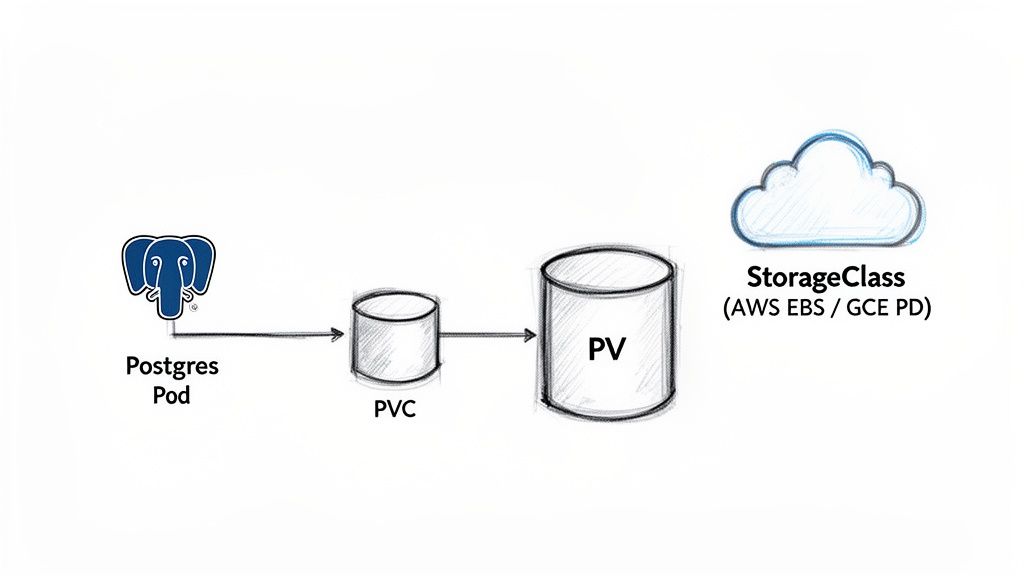
The Kubernetes storage model is architected around two core API objects: PersistentVolumes (PVs) and PersistentVolumeClaims (PVCs). A PV represents a piece of storage in the cluster, provisioned either manually by an administrator or dynamically by a storage provider. It is a cluster-level resource, analogous to CPU or memory.
A PVC is a request for storage made by a user or an application. The PostgreSQL pod uses a PVC to formally request a volume with specific characteristics, such as size and access mode.
This abstraction layer decouples the application's storage requirements from the underlying physical storage implementation. The pod remains agnostic to whether its data resides on an AWS EBS volume, a GCE Persistent Disk, or an on-premises SAN. It simply requests storage via a PVC, and Kubernetes orchestrates the binding.
Dynamic Provisioning with StorageClasses
Manual PV provisioning is a tedious, error-prone process that does not scale in dynamic environments. StorageClasses solve this problem by enabling automated, on-demand storage provisioning. A StorageClass object defines a "class" of storage, specifying a provisioner (e.g., ebs.csi.aws.com), performance parameters (e.g., IOPS, throughput), and behavior (e.g., reclaimPolicy).
When a PVC references a specific StorageClass, the corresponding provisioner automatically creates a matching PV. This is the standard operational model in any cloud-native environment.
Consider this example of a StorageClass for high-performance gp3 volumes on AWS:
apiVersion: storage.k8s.io/v1
kind: StorageClass
metadata:
  name: gp3-fast
provisioner: ebs.csi.aws.com
parameters:
  type: gp3
  fsType: ext4
  iops: "4000"
  throughput: "200"
reclaimPolicy: Retain
allowVolumeExpansion: true
The
reclaimPolicy: Retaindirective is a critical safety mechanism for production databases. It instructs Kubernetes to preserve the underlying physical volume and its data even if the associated PVC is deleted. This setting prevents catastrophic, accidental data loss.
Defining Your PersistentVolumeClaim
With a StorageClass defined, the PVC for a PostgreSQL instance can be specified. This is typically done within the volumeClaimTemplates section of a StatefulSet, a feature that ensures each pod replica receives its own unique, persistent volume.
A key configuration is the access mode. As a single-writer database, PostgreSQL almost always requires ReadWriteOnce (RWO). This mode enforces that the volume can be mounted as read-write by only a single node at a time, aligning perfectly with the requirements of a primary PostgreSQL instance.
Here is a practical PVC definition within a StatefulSet manifest:
spec:
  volumeClaimTemplates:
  - metadata:
      name: postgres-data
    spec:
      accessModes: [ "ReadWriteOnce" ]
      storageClassName: "gp3-fast"
      resources:
        requests:
          storage: 50Gi
This declaration instructs Kubernetes to create a PVC named postgres-data for each pod, requesting 50GiB of storage from the gp3-fast StorageClass. The AWS CSI driver then provisions an EBS volume with the specified performance characteristics and binds it to the pod.
Managing infrastructure declaratively is a cornerstone of modern DevOps. For a deeper understanding of this approach, explore how to use tools like Terraform with Kubernetes.
Advanced Storage Operations
Beyond initial provisioning, production database management requires handling advanced storage operations.
Zero-Downtime Volume Expansion: If the
StorageClassis configured withallowVolumeExpansion: true, you can resize PVCs without service interruption. By editing the live PVC object (kubectl edit pvc postgres-data-my-pod-0) and increasing thespec.resources.requests.storagevalue, the cloud provider's CSI driver will resize the underlying disk, and the kubelet will expand the filesystem to utilize the new capacity.Volume Snapshots: The Kubernetes
VolumeSnapshotAPI provides a declarative interface for creating point-in-time snapshots of PVs. This functionality integrates with the underlying storage provider's native snapshot capabilities and is essential for backup and disaster recovery strategies, enabling data restoration or cloning of entire database environments for testing.
Mastering these storage concepts is fundamental to building a resilient data layer that provides the stability and performance required for PostgreSQL in a cloud-native environment.
Implementing High Availability and Replication
A production database must guarantee continuous data accessibility for its client applications. For any serious PostgreSQL in Kubernetes deployment, high availability (HA) is a non-negotiable requirement. The system must be architected to withstand failures—such as node outages or pod crashes—and maintain service continuity without manual intervention.
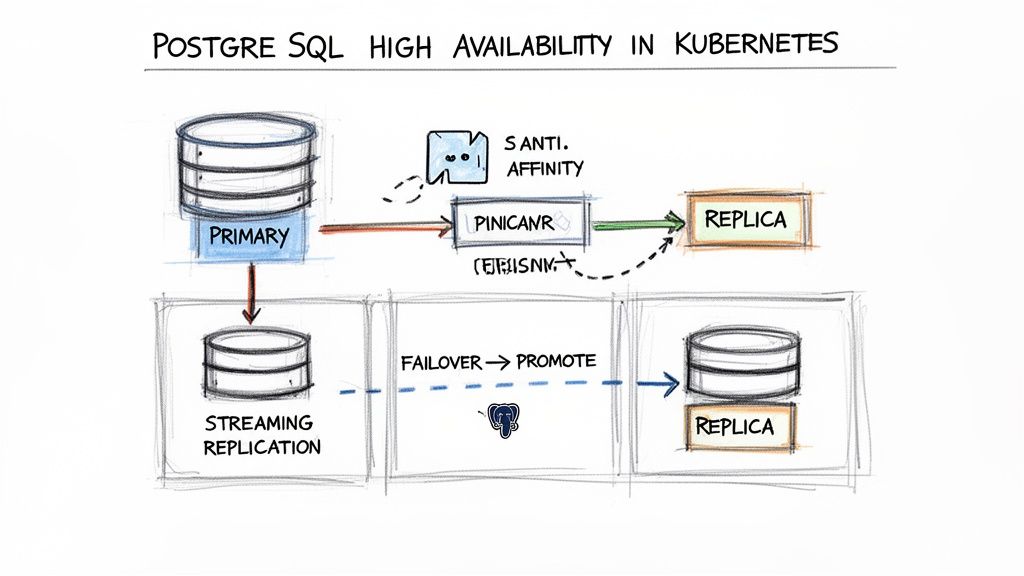
The standard, battle-tested architecture for a fault-tolerant PostgreSQL cluster is the primary-replica model. A single primary instance handles all write operations, while one or more replica instances maintain near real-time copies of the data via streaming replication. This design serves a dual purpose: it enables read traffic scaling and provides the foundation for automated failover.
Architecting for Resilience with Pod Anti-Affinity
The robustness of an HA strategy is determined by its weakest link. A common architectural flaw is co-locating all database pods on the same physical Kubernetes node, which creates a single point of failure. Pod anti-affinity is the mechanism to prevent this.
Pod anti-affinity rules instruct the Kubernetes scheduler to avoid placing specified pods on the same node, ensuring genuine physical redundancy across your cluster.
The following manifest snippet, applied to a StatefulSet or Operator CRD, enforces this distribution:
affinity:
  podAntiAffinity:
    requiredDuringSchedulingIgnoredDuringExecution:
    - labelSelector:
        matchExpressions:
        - key: app.kubernetes.io/name
          operator: In
          values:
          - postgresql
      topologyKey: "kubernetes.io/hostname"
This rule prevents the scheduler from placing a new PostgreSQL pod on any node that already contains a pod matching the label app.kubernetes.io/name=postgresql. The topologyKey: "kubernetes.io/hostname" ensures this separation occurs at the physical node level.
Enabling Streaming Replication
With pods properly distributed, the next step is to establish data replication. Streaming replication is PostgreSQL's native mechanism for continuously transmitting Write-Ahead Log (WAL) records from the primary to its replicas.
Modern Kubernetes Operators typically automate this configuration. You declare the desired number of replicas, and the operator handles the underlying configuration of PostgreSQL parameters like primary_conninfo and restore_command, manages secrets, and bootstraps the new replicas.
For a manual implementation, each replica pod must be configured to connect to the primary's service endpoint to initiate the replication stream. The result is a set of hot standbys, ready to be promoted if the primary fails.
The component that elevates a replicated cluster to a true high-availability system is an automated failover manager. Tools like Patroni or a dedicated Operator continuously monitor the primary's health. Upon detecting a failure, the manager initiates a leader election process to promote the most up-to-date replica to the new primary, automatically reconfiguring clients and other replicas to connect to the new leader.
This automated promotion process is the core mechanism for maintaining database availability through infrastructure failures.
Configuring Health Probes for Accurate Monitoring
Kubernetes relies on liveness and readiness probes to determine the health of a container. Misconfigured probes are a common source of instability, leading to unnecessary pod restarts (CrashLoopBackOff) or, conversely, routing traffic to unresponsive instances.
- Readiness Probe: Signals to Kubernetes when a pod is ready to accept traffic. For a replica, this should mean it is fully synchronized with the primary.
- Liveness Probe: Checks if the container is still running. If this probe fails, Kubernetes will restart the container.
A simple pg_isready check is a reasonable starting point for a liveness probe, but a more robust readiness probe is required.
This example demonstrates a more sophisticated probe configuration:
livenessProbe:
  exec:
    command: ["pg_isready", "-U", "postgres", "-h", "127.0.0.1", "-p", "5432"]
  initialDelaySeconds: 30
  timeoutSeconds: 5
readinessProbe:
  exec:
    command:
      - sh
      - -c
      - "pg_isready -U postgres && psql -U postgres -c 'SELECT 1'"
  initialDelaySeconds: 10
  timeoutSeconds: 5
  periodSeconds: 10
The readiness probe performs a two-stage check: it first uses pg_isready to verify that the server is accepting connections, then executes a simple SELECT query to confirm that the database is fully operational. Properly tuned probes provide Kubernetes with the accurate health telemetry needed to manage a resilient HA database cluster.
Securing Your PostgreSQL Deployment
Running a database in a shared, multi-tenant environment like Kubernetes requires a defense-in-depth security model. Security must be implemented at every layer of the stack, from network access controls to internal database permissions. If one security layer is compromised, subsequent layers must be in place to protect the data.
This is a critical consideration in the current landscape. The migration to containerized infrastructure is accelerating; two out of three Kubernetes clusters now run in the cloud, a significant increase from 45% in 2022. With 96% of organizations using or evaluating Kubernetes, securing these deployments has become a top priority. The 2024 Kubernetes in the Wild report provides further detail on this trend.
Locking Down Network Access
The first line of defense is the network layer. By default, Kubernetes allows open communication between all pods within a cluster, which poses a significant security risk for a database. NetworkPolicies are the native Kubernetes resource for controlling this traffic.
A NetworkPolicy acts as a stateful, pod-level firewall. You can define explicit ingress and egress rules to enforce the principle of least privilege at the network level. For example, you can specify that only pods with a specific label are allowed to connect to your PostgreSQL instance on port 5432.
This example NetworkPolicy only allows ingress traffic from pods with the label app: my-backend to PostgreSQL pods labeled role: db:
apiVersion: networking.k8s.io/v1
kind: NetworkPolicy
metadata:
  name: postgres-allow-backend
spec:
  podSelector:
    matchLabels:
      role: db
  policyTypes:
  - Ingress
  ingress:
  - from:
    - podSelector:
        matchLabels:
          app: my-backend
    ports:
    - protocol: TCP
      port: 5432
Applying this manifest immediately segments network traffic, dramatically reducing the database's attack surface.
Encrypting Data and Managing Secrets
With network access controlled, the next priority is protecting the data itself through encryption and secure credential management.
TLS for Data-in-Transit: Encrypting all network connections is non-negotiable. This includes client-to-database connections as well as replication traffic between the primary and replica instances. PostgreSQL Operators like CloudNativePG can automate certificate management, but tools like
cert-managercan also be used to provision and rotate TLS certificates.Kubernetes Secrets for Credentials: Database passwords and other sensitive credentials should never be hardcoded in manifests or container images. Kubernetes Secrets are the appropriate mechanism for storing this information. Credentials stored in Secrets can be mounted into pods as environment variables or files, decoupling them from application code and version control.
For robust secret management, a best practice is to use the External Secrets Operator. This tool synchronizes credentials from a dedicated secrets manager—such as AWS Secrets Manager or HashiCorp Vault—directly into Kubernetes Secrets. This establishes a single source of truth and enables centralized, policy-driven control over all secrets.
Implementing PostgreSQL Role-Based Access Control
Security measures must extend inside the database itself. PostgreSQL provides a powerful Role-Based Access Control (RBAC) system that is essential for enforcing the principle of least privilege at the data access layer.
Instead of allowing all applications to connect with the superuser (postgres) role, create specific database roles for each application or user. Grant each role the minimum set of permissions required for its function (e.g., SELECT on specific tables). This simple step adds a critical layer of internal security, limiting the impact of a compromised application.
Monitoring Performance and Troubleshooting
Provisioning a production-grade database is only the initial phase. The ongoing operational challenge is maintaining its health and performance. For PostgreSQL in Kubernetes, effective monitoring is not merely reactive; it involves proactively identifying performance bottlenecks, analyzing resource utilization, and resolving issues before they impact end-users.
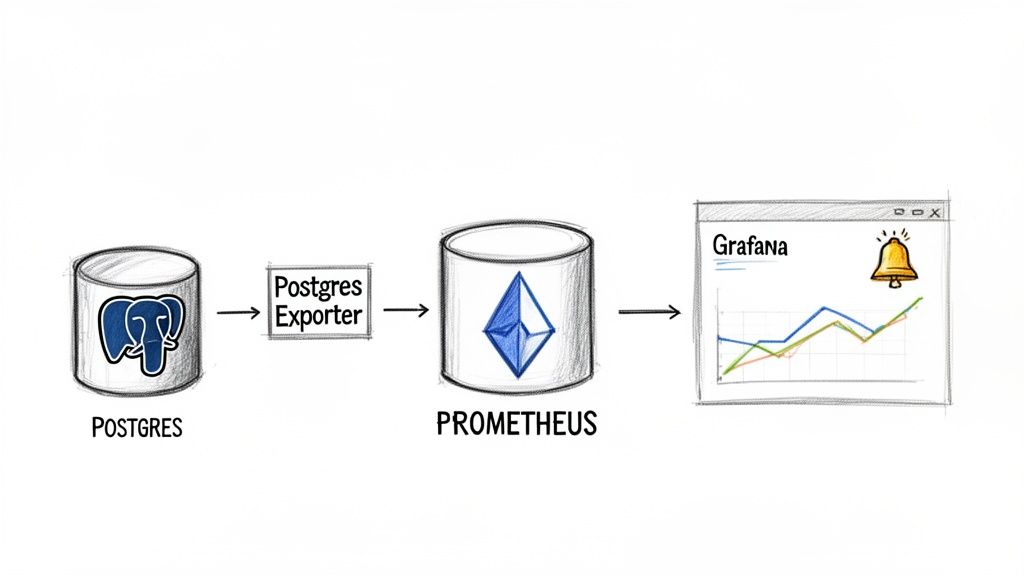
The de facto standard for observability in Kubernetes is the Prometheus ecosystem. The key component for database monitoring is the PostgreSQL Exporter, a tool that scrapes a wide range of metrics directly from PostgreSQL instances. Deployed as a sidecar or a separate pod, it connects to the database and exposes its internal statistics in a format that Prometheus can ingest, store, and query.
Key Metrics to Watch
A vast number of metrics are available, but focusing on a key set provides the most insight into database health and performance.
- Query Performance: Track metrics like
pg_stat_activity_max_tx_duration. This is invaluable for identifying long-running queries that consume excessive resources and can degrade application performance. - Connection Counts: Monitor
pg_stat_activity_count. Reaching the configuredmax_connectionslimit will cause new connection attempts to fail, resulting in application-level errors. - Cache Hit Rates: The
pg_stat_database_blks_hitandpg_stat_database_blks_readmetrics are critical for assessing performance. A high cache hit ratio, ideally exceeding 99%, indicates that the database is efficiently serving queries from memory rather than performing slow disk I/O. - Replication Lag: In an HA cluster,
pg_stat_replication_replay_lagis essential. This metric quantifies how far a replica is behind the primary, which is a critical indicator of failover readiness.
Visualizing this data in Grafana dashboards transforms raw numbers into actionable trends. Integrating with Alertmanager allows for automated notifications (e.g., via Slack or PagerDuty) when key metrics breach predefined thresholds. For a more detailed guide, see our article on monitoring Kubernetes with Prometheus.
A Practical Troubleshooting Checklist
A methodical, systematic approach is essential for effective troubleshooting. When an issue arises, follow this checklist to diagnose the root cause efficiently.
The global database market grew by 13.4% in 2023, according to Gartner, with relational databases like PostgreSQL still comprising nearly 80% of the total market. This underscores the increasing importance of robust monitoring and troubleshooting skills for modern infrastructure engineers. You can discover more insights about this market expansion.
For a misbehaving pod, begin with these diagnostic steps:
- Check Pod Status: Execute
kubectl describe pod <pod-name>. TheEventssection often reveals the cause of failures, such as image pull errors, failed readiness probes, or OOMKilled events. ACrashLoopBackOffstatus indicates a persistent startup failure. - Inspect Pod Logs: Use
kubectl logs <pod-name>to view the standard output from the PostgreSQL process. This is the most direct way to identify startup errors, configuration issues, or internal database exceptions. - Verify PVC Status: If a pod is stuck in the
Pendingstate, inspect its PVC withkubectl describe pvc <pvc-name>. AnUnboundstatus typically indicates a misconfiguredstorageClassNameor a lack of available PersistentVolumes matching the claim's request. - Connect to the Database: If the pod is running but performance is degraded, gain shell access using
kubectl exec -it <pod-name> -- /bin/bash. From within the container, usepsqland other command-line tools to inspect active queries (pg_stat_activity), check for locks (pg_locks), and analyze the database's real-time behavior.
Frequently Asked Questions
When you're first getting your feet wet running PostgreSQL in Kubernetes, a few common questions always seem to pop up. Let's tackle them head-on so you can sidestep the usual traps and move forward with confidence.
Is It Safe for Production Workloads?
Yes, absolutely. This used to be a point of debate, but not anymore. Modern Kubernetes, especially when you bring in a mature Operator like CloudNativePG, has all the primitives needed to run your most critical databases.
We're talking about things like StatefulSets, Persistent Volumes, and rock-solid failover logic. It's every bit as reliable as the old-school deployment models, but you gain the immense power of declarative management. The trick, of course, is nailing down a solid strategy for storage, high availability, and security from the start.
What Is the Best Way to Handle Backups?
Declarative, automated backups are the only way to go. The gold standard is using an Operator that talks directly to object storage like AWS S3 or Azure Blob Storage.
You can define your entire backup schedule and retention policies right in a manifest. This gives you automated base backups and continuous Point-in-Time Recovery (PITR). Best of all, your backup strategy is now version-controlled and applied consistently everywhere.
I've seen too many teams get burned by relying on manual
pg_dumpcommands triggered by CronJobs. It's a brittle approach that doesn't scale and completely misses the continuous WAL archiving you need for real disaster recovery. An Operator-driven strategy is just far more resilient.
Should I Build My Own PostgreSQL Docker Image?
For the vast majority of teams, the answer is a hard no. You're much better off using official or vendor-supported images, like the ones from CloudNativePG or Bitnami.
Think about it: these images are constantly scanned for vulnerabilities, fine-tuned for container environments, and maintained by people who live and breathe this stuff. Rolling your own image just piles on a massive maintenance burden and opens you up to security risks unless you have a dedicated team managing it 24/7.
Ready to implement a rock-solid PostgreSQL strategy in your Kubernetes environment? The expert engineers at OpsMoon specialize in building and managing scalable, resilient database infrastructure. We can help you navigate everything from architecture design to production monitoring. Start with a free work planning session today.
Leave a Reply