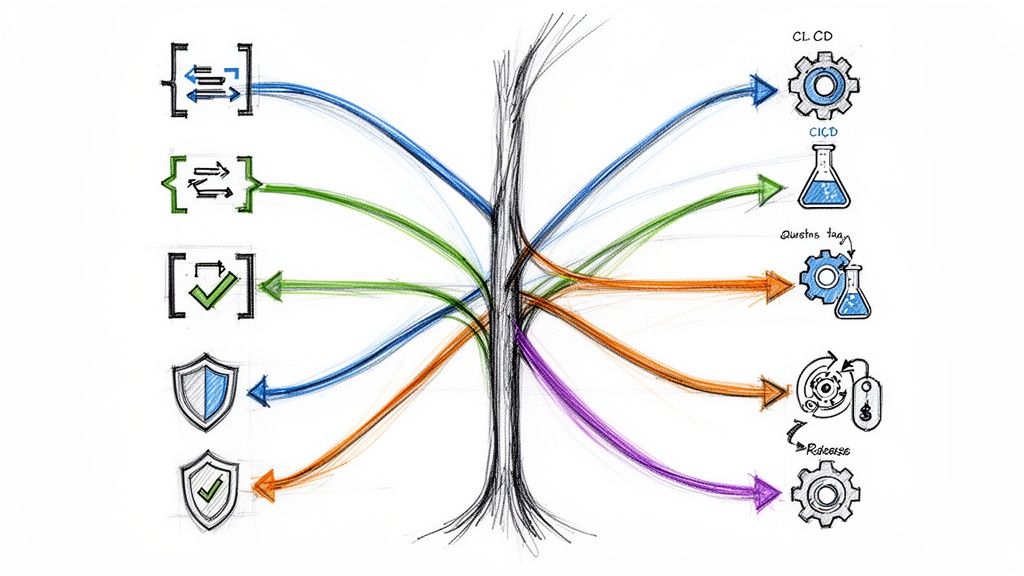
Git is the backbone of modern software development, but knowing git commit is not enough. The difference between a high-performing DevOps team and one tangled in merge conflicts lies in its workflow. An optimized Git strategy is a blueprint for collaboration, code quality, and deployment velocity. It dictates how features are developed via branching models, how code quality is enforced through pull requests, and how releases are managed, directly impacting your team's ability to deliver value quickly and reliably.
This guide moves beyond surface-level advice to provide a technical roundup of 10 battle-tested git workflow best practices. We'll dissect each model, from the disciplined structure of Git Flow to the high-velocity world of Trunk-Based Development, providing actionable commands, real-world scenarios, and the critical trade-offs you need to consider. We will explore everything from branching models and commit message conventions to advanced strategies like GitOps for infrastructure management.
Whether you're a startup CTO scaling an engineering team or a platform engineer in a large enterprise, this deep dive will equip you with the knowledge to select and implement the right workflow for your project's specific needs. You will learn the why and how behind each practice. This article is a practical, instructive resource for turning your Git repository into a streamlined engine for continuous delivery. Let's explore the strategies that elite engineering teams use to build, test, and deploy software with precision and speed.
1. Git Flow Workflow
The Git Flow workflow, originally proposed by Vincent Driessen, is a highly structured branching model designed for projects with scheduled release cycles. It introduces a set of dedicated, long-lived branches and several supporting branches, each with a specific purpose. This model provides a robust framework for managing larger projects, making it a cornerstone of many git workflow best practices.
The core of Git Flow revolves around two primary branches with infinite lifetimes:
main(ormaster): This branch always reflects a production-ready state. All commits onmainmust be tagged with a release number (e.g.,git tag -a v1.0.1 -m "Release version 1.0.1").develop: This branch serves as the primary integration branch for features. It contains the complete history of the project, whilemaincontains an abridged version.
How It Works in Practice
Supporting branches are used to facilitate parallel development, manage releases, and apply urgent production fixes. These branches have limited lifetimes and are merged back into the primary branches.
- Feature Branches (
feature/*): Branched fromdevelopto build new features. Once a feature is complete, it is merged back intodevelop. For example:# Start a new feature git checkout develop git pull git checkout -b feature/user-auth # ...do work... git add . git commit -m "feat: Implement user authentication endpoint" # Merge back into develop git checkout develop git merge --no-ff feature/user-auth - Release Branches (
release/*): Whendevelophas enough features for a release, arelease/*branch is created from it for final bug fixes and release-oriented tasks. Once ready, it is merged into bothmainanddevelop. - Hotfix Branches (
hotfix/*): Created directly frommainto address critical production bugs. Once the fix is complete, the hotfix branch is merged into bothmain(to patch production) anddevelop(to ensure the fix isn't lost).
When to Use Git Flow
This workflow excels in scenarios requiring a strict, controlled release process, such as:
- Enterprise Software: Where multiple versions of a product must be maintained and supported in production simultaneously.
- Mobile App Development: Teams managing staged rollouts and needing to support older app versions while developing new features.
- Projects with Scheduled Releases: It's ideal for projects that follow a traditional release schedule (e.g., quarterly or biannual updates) rather than continuous deployment.
To streamline implementation, teams can use the git-flow extension, a command-line tool that automates the branching and merging operations prescribed by this workflow.
2. GitHub Flow (Trunk-Based Development Variant)
GitHub Flow is a lightweight, trunk-based development strategy designed for teams practicing continuous delivery and deployment. Popularized by GitHub, this workflow simplifies branching by centering all work around a single primary branch, main. It is one of the most streamlined git workflow best practices, prioritizing rapid iteration, frequent releases, and a simplified process that minimizes merge complexity.
The core principle of GitHub Flow is that main is always deployable. All development starts by creating a new, descriptively named branch off main. This branch exists to address a single, specific concern, such as a bug fix or a new feature.
How It Works in Practice
The workflow is built for speed and removes the need for develop or release branches, focusing entirely on short-lived topic branches.
- Create a Branch: Before writing code, create a new branch from
main:git checkout -b improve-api-response-time. - Develop and Commit: Add commits locally and push them regularly to the same named branch on the server:
git push -u origin improve-api-response-time. This keeps work backed up and visible. - Open a Pull Request (PR): When ready for review, open a pull request. This initiates a formal code review and triggers automated CI checks defined in your
.github/workflows/directory. - Review and Discuss: Team members review the code, add comments, and discuss changes. The author pushes further commits to the branch based on feedback.
- Deploy and Merge: Once the PR is approved and all CI checks pass, the branch is deployed directly to a staging or production environment for final testing. If it passes, it is immediately merged into
main, andmainis deployed again to finalize the release.
When to Use GitHub Flow
This model is exceptionally well-suited for web applications, SaaS products, and any project where continuous deployment is a primary goal.
- CI/CD Environments: Its simplicity integrates perfectly with automated testing and deployment pipelines.
- Startups and SaaS Companies: Teams at companies like Stripe and Heroku benefit from the rapid feedback loops and ability to ship features multiple times a day.
- Projects Without Versioning: Ideal for continuously updated web services where there isn't a need to support multiple deployed versions simultaneously.
3. Trunk-Based Development
Trunk-Based Development is a source-control branching model where all developers commit to a single shared branch, main (the "trunk"). Instead of long-lived feature branches, developers either commit directly to the trunk or use extremely short-lived branches that are merged within hours, typically no more than a day. This practice is a cornerstone of Continuous Integration and Continuous Delivery (CI/CD).
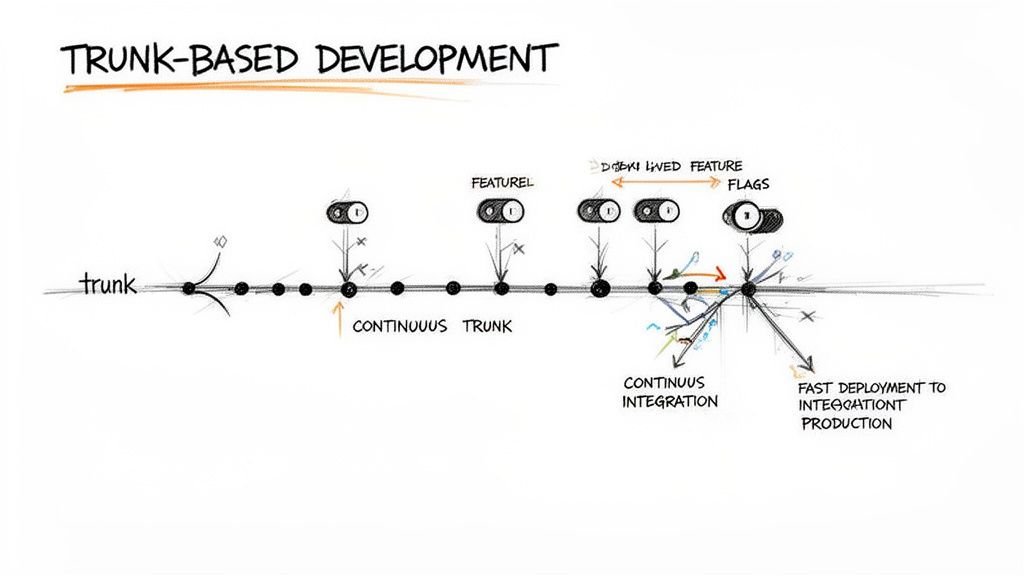
The primary goal is to minimize merge conflicts and ensure main is always in a releasable state. By integrating small, frequent changes, the feedback loop from testing to deployment is dramatically shortened, accelerating delivery velocity and reducing integration risk. This model contrasts sharply with workflows that isolate features in long-running branches.
How It Works in Practice
Success with Trunk-Based Development hinges on a robust ecosystem of automation and specific development practices. The workflow is not simply about committing to main; it requires a disciplined approach to maintain stability.
- Small, Atomic Commits: Developers break down work into the smallest possible logical chunks. Each commit must be self-contained, pass all automated checks, and not break the build. A commit should ideally be under 100 lines of changed code to facilitate quick, effective code reviews.
- Feature Flags (Toggles): In-progress features are hidden behind feature flags. This allows incomplete code to be merged safely into the
mainbranch without affecting users, enabling teams to decouple deployment from release. - Comprehensive Automated Testing: A fast and reliable test suite is non-negotiable. The CI pipeline acts as a gatekeeper, running unit, integration, and end-to-end tests on every commit to prevent regressions. A typical pipeline should complete in under 5-10 minutes.
- Observability and Monitoring: With changes going directly to production, strong observability (logs, metrics, traces) and alerting systems are critical to quickly detect and respond to issues post-deployment.
When to Use Trunk-Based Development
This high-velocity workflow is one of the key git workflow best practices for teams prioritizing speed and continuous delivery. It is ideal for:
- High-Performing DevOps Teams: Organizations like Google, Meta, and Amazon that practice CI/CD and deploy multiple times per day.
- Cloud-Native and SaaS Applications: Where rapid iteration and immediate feedback from production are essential.
- Projects with a Strong Test Culture: Its success is directly tied to the quality and coverage of automated testing.
Trunk-Based Development requires significant investment in automation and a cultural shift towards collective code ownership, but it pays dividends by eliminating merge hell and enabling elite-level software delivery performance.
4. Feature Branch Workflow with Code Reviews
The Feature Branch Workflow is a highly collaborative model where all new development happens in dedicated, isolated branches. Popularized by platforms like GitHub and GitLab, this approach integrates code reviews directly into the development cycle through Pull Requests (or Merge Requests). This process establishes a critical quality gate, ensuring no code is merged into the main integration branch (main or develop) without peer review and automated checks.
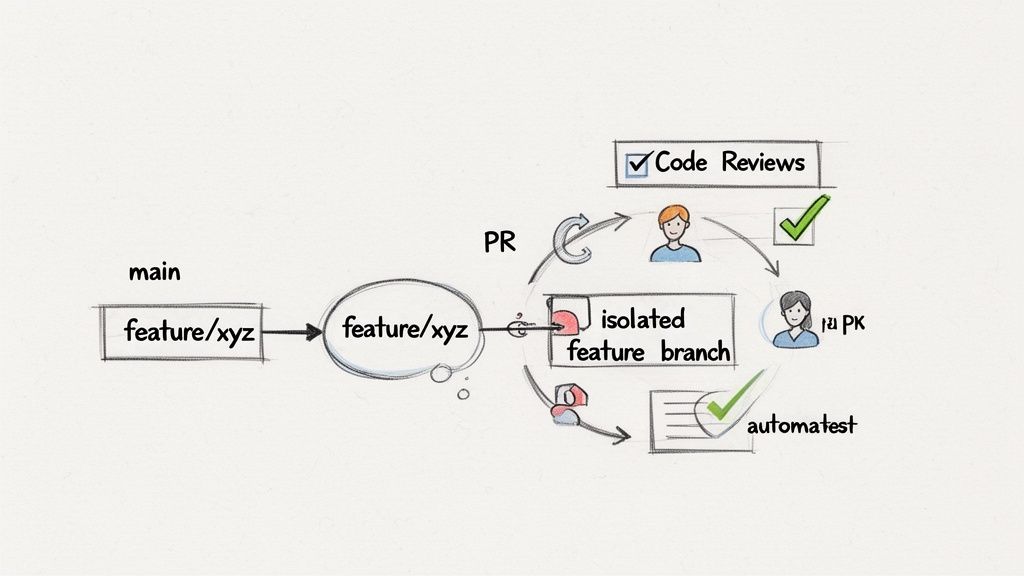
This model is a foundational component of modern git workflow best practices, fostering both code quality and team collaboration. The primary goal is to keep the main branch stable and deployable while allowing developers freedom to iterate in isolated environments.
How It Works in Practice
The workflow follows a repeatable cycle for every new piece of work. The process is designed to be straightforward and easily automated.
- Create a Feature Branch: A developer starts by creating a new branch from an up-to-date
mainordevelopbranch:git checkout -b feature/add-user-login. Branches are named descriptively. - Develop and Commit: The developer makes changes on this feature branch, committing work frequently with clear, atomic commit messages. This work is isolated and does not affect the main codebase.
- Open a Pull/Merge Request (PR/MR): Once the feature is complete and pushed to the remote repository, the developer opens a PR. This action signals that the code is ready for review and initiates the quality assurance process.
- Automated Checks and Peer Review: Opening a PR triggers CI/CD pipelines to run automated tests, linting, and security scans. Concurrently, teammates review the code, providing feedback directly within the PR.
- Merge: After the code passes all checks and receives approval from reviewers (e.g., using GitHub's "required reviews" branch protection rule), it is merged into the target branch (
mainordevelop), and the feature branch is deleted.
When to Use the Feature Branch Workflow
This workflow is extremely versatile and is considered the standard for most modern software development teams. It is particularly effective for:
- Agile and Scrum Teams: Its iterative nature aligns perfectly with sprint-based development, where work is broken down into small, manageable tasks.
- CI/CD Environments: The PR is a natural integration point for automated build, test, and deployment pipelines, making it a cornerstone of continuous integration.
- Distributed or Asynchronous Teams: It provides a structured forum for code discussion and knowledge sharing, regardless of timezone differences. Companies like Shopify and GitLab use this workflow to maintain high code quality.
5. Release Branch Strategy
The Release Branch Strategy is a disciplined approach to managing software releases by creating dedicated, short-lived branches from a primary development line (like develop or main). This strategy isolates the release stabilization process, allowing development teams to continue working on new features in parallel without disrupting the release candidate. It is a critical component of many git workflow best practices for teams needing a controlled and predictable release cycle.
The core principle is to "freeze" features at a specific point. A new release/* branch (e.g., release/v2.1.0) is created from the development branch when it reaches a state of feature completeness for the upcoming release.
How It Works in Practice
This workflow creates a clear separation between ongoing development and release preparation. The process is straightforward and focuses on isolation and stabilization.
- Branch Creation: When a release is planned, a
release/*branch is forked from thedevelopbranch:git checkout -b release/v2.1.0 develop. This marks the "feature freeze". - Stabilization Phase: The release branch becomes a protected environment. Only bug fixes, documentation updates, and other release-specific tasks are performed here. New features are strictly forbidden.
- Release and Merge: Once the release branch is stable and has passed all QA checks, it is merged into
mainand tagged:git checkout main git merge --no-ff release/v2.1.0 git tag -a v2.1.0Crucially, it is also merged back into
developto ensure that any bug fixes made during stabilization are not lost:git checkout develop git merge --no-ff release/v2.1.0
When to Use a Release Branch Strategy
This strategy is highly effective for teams that manage scheduled releases and need to ensure production stability without halting development momentum.
- Enterprise Software: Ideal for products like those from banking or finance, where releases follow strict regulatory and validation schedules.
- Major Open Source Projects: Used by projects like Node.js for their Long-Term Support (LTS) releases.
- Browser Releases: Teams behind Chrome and Firefox use this model to manage their complex release trains.
- CI/CD Integration: This strategy integrates seamlessly with modern CI/CD pipelines. A dedicated pipeline can be triggered for each
release/*branch to run extensive regression tests and automate deployments to staging environments. For a deeper dive, explore these CI/CD pipeline best practices on opsmoon.com.
6. Forking Workflow for Open-Source Collaboration
The Forking Workflow is a distributed model fundamental to open-source projects. Instead of developers pushing to a single central repository, each contributor creates a personal, server-side copy (a "fork") of the main repository. This approach allows anyone to contribute freely without needing direct push access to the official project, making it a cornerstone of git workflow best practices for community-driven development.
The core of this workflow is the separation between the official "upstream" repository and the contributor's forked repository.
- Upstream Repository: The single source of truth for the project. Only core maintainers have direct push access.
- Forked Repository: A personal, server-side clone owned by the contributor. All development work happens here, on feature branches within the fork.
How It Works in Practice
The contribution cycle involves pulling changes from the upstream repository to keep the fork synchronized, and then proposing changes back upstream via a pull request.
- Forking and Cloning: A contributor first creates a fork on GitHub. They then clone their forked repository to their local machine:
git clone git@github.com:contributor/project.git. - Remote Configuration: Developers configure the original upstream repository as a remote:
git remote add upstream https://github.com/original-owner/project.git. This allows them to fetch updates. - Developing Features: Work is done on a dedicated feature branch. Before submitting, they sync with upstream changes:
git fetch upstream git rebase upstream/main - Submitting a Pull Request: Once the feature is complete, the contributor pushes the feature branch to their forked repository (
git push origin feature/new-feature). From there, they open a pull request to the upstream repository, initiating code review.
When to Use the Forking Workflow
This workflow is the standard for projects that rely on contributions from a large, distributed community.
- Open-Source Projects: It is the default collaboration model for ecosystems like Kubernetes, TensorFlow, and Apache Software Foundation projects.
- Large Enterprise Environments: Companies can use this model to manage contributions from different departments or partner organizations without granting direct access to core codebases.
- Projects Requiring Strict Access Control: It provides a clear and enforceable boundary between core maintainers and external contributors, enhancing security.
To successfully manage this workflow, maintainers should establish clear guidelines in a CONTRIBUTING.md file and utilize features like pull request templates and automated CI checks to streamline the review process.
7. Environment-Based Branching (Dev/Staging/Prod)
The Environment-Based Branching workflow aligns your version control structure directly with your deployment pipeline. This model uses dedicated, long-lived branches that correspond to specific deployment environments, such as development, staging, and production. It establishes a clear and automated promotion path for code, making it an essential practice for teams practicing continuous deployment.
The core of this model revolves around a few key branches:
develop: The integration point for all new features. Commits todeveloptrigger automated deployments to a development environment.staging: Represents a pre-production environment. Code is promoted fromdeveloptostagingfor UAT and final validation.main(orproduction): Mirrors the code running in production. Merging code intomaintriggers the final deployment to live servers.
How It Works in Practice
This workflow creates a highly structured and often automated code promotion lifecycle. The process moves code progressively from a less stable to a more stable environment.
- Feature Development: Developers create short-lived feature branches from
develop, which are then merged back intodevelop, kicking off builds and tests in the dev environment. - Promotion to Staging: When ready for pre-production testing, a pull request is opened from
developtostaging. Merging this PR automatically deploys the code to the staging environment for final validation. - Production Release: After the code is vetted on staging, a PR is opened from
stagingtomain. This merge is the final trigger, deploying the tested and approved code to production. - Hotfixes: Critical production bugs are handled by creating a
hotfixbranch frommain, fixing the issue, and then merging it back intomain,staging, anddevelopto maintain consistency across all environments.
When to Use Environment-Based Branching
This model is exceptionally effective for teams that need a clear, automated path to production, making it a staple for modern web applications.
- SaaS Platforms: Ideal for services requiring frequent, reliable updates without disrupting users.
- Continuous Deployment: A perfect fit for teams that have automated their testing and deployment pipelines.
- Heroku-Style Deployments: This workflow is native to many Platform-as-a-Service (PaaS) providers that link deployments directly to specific Git branches.
By mapping branches to environments, teams achieve a high degree of automation and visibility into what code is running where. To dive deeper into this and other related models, you can learn more about various software deployment strategies.
8. Semantic Commit Messages and Conventional Commits
Semantic commit messages, formalized by the Conventional Commits specification, are a standardized approach to writing commit messages that follow a strict format. This practice moves beyond simple descriptions to embed machine-readable meaning into your commit history, transforming it from a simple log into a powerful source for automation.
The core of Conventional Commits is a structured message format: type(scope): description.
type: A mandatory prefix likefeat(new feature),fix(a bug fix),docs,style,refactor,test, orchore.scope: An optional noun describing the section of the codebase affected (e.g.,api,auth,ui).description: A concise, imperative-mood summary of the change. AddingBREAKING CHANGE:to the footer signals a major version bump.
How It Works in Practice
By enforcing this structure, teams unlock significant automation and enhance communication. The commit history itself becomes the source of truth for versioning and release notes.
- Automated Versioning: Tools like
semantic-releasecan parse the commit history, identifyfeatcommits to trigger a minor version bump (e.g., 1.2.0 to 1.3.0),fixcommits for a patch bump (e.g., 1.2.0 to 1.2.1), andBREAKING CHANGE:footers for a major bump (e.g., 1.2.0 to 2.0.0). - Automated Changelog Generation: The same structured commits can be used to automatically generate detailed, organized changelogs for each release.
- Improved Readability: A developer can quickly scan
git log --onelineand understand the nature and impact of every change without reading the full diff, making code reviews and debugging far more efficient. Learn more about how this improves overall control in our guide to version control best practices.
When to Use Conventional Commits
This practice is highly recommended for projects that value automation, clarity, and a disciplined release process.
- CI/CD Environments: Where automated versioning and release notes are critical for a fast, reliable delivery pipeline.
- Open-Source Projects: The Angular and Kubernetes projects are prime examples of its successful implementation.
- Large or Distributed Teams: A standardized commit format ensures everyone communicates changes in the same language.
To enforce this practice, teams can integrate tools like commitlint with Git hooks (using husky) to validate messages before a commit is created, ensuring universal adoption.
9. GitOps Workflow with Infrastructure as Code
GitOps is an operational framework that takes DevOps best practices like version control, collaboration, and CI/CD, and applies them to infrastructure automation. It uses Git as the single source of truth for declarative infrastructure and applications, treating infrastructure definitions as code (IaC) that lives in a Git repository.
The core principle of GitOps is that the Git repository always contains a declarative description of the desired production state. An automated agent running in the target environment (e.g., a Kubernetes cluster) continuously monitors the repository and the live system, reconciling any differences to ensure the infrastructure matches the state defined in Git.
How It Works in Practice
The GitOps workflow is driven by pull requests and automated reconciliation, unifying development and operations through a shared process.
- Declarative Definitions: Infrastructure is defined declaratively using tools like Terraform (
.tf), Ansible (.yml), or Kubernetes manifests (.yaml). These files are stored in a Git repository. - Pull Request Workflow: To change infrastructure, an engineer opens a pull request with the updated IaC files. This PR goes through the standard code review, static analysis (
terraform validate), and approval process. - Automated Reconciliation: Once the PR is merged, an automated agent like ArgoCD or Flux detects the change in the Git repository. It then automatically applies the required changes to the live infrastructure to match the new desired state. This "pull-based" model enhances security by removing the need for direct cluster credentials in CI pipelines.
When to Use GitOps
This workflow is exceptionally powerful for managing complex, distributed systems and is ideal for:
- Kubernetes-Native Environments: GitOps is the de facto standard for managing application deployments and cluster configurations on Kubernetes, using tools like ArgoCD.
- Cloud Infrastructure Management: Teams managing cloud resources on AWS, Azure, or GCP with Terraform can use GitOps to automate provisioning and updates in a traceable, auditable manner.
- Organizations with Multiple Microservices: Companies like Stripe use GitOps to manage hundreds of microservices, ensuring consistent and reliable deployments.
By making Git the control plane for your entire system, GitOps provides a complete audit trail of all changes (git log), simplifies rollbacks (git revert), and dramatically improves deployment velocity and reliability.
10. Squash and Rebase Strategy for Clean History
The squash and rebase strategy is a disciplined approach focused on maintaining a clean, linear, and highly readable project history. This method prioritizes making the main branch’s history a concise story of feature implementation rather than a messy log of every individual development step. It is one of the most effective git workflow best practices for teams that value clarity and maintainability.
This strategy revolves around two core Git commands:
git rebase: Re-applies commits from a feature branch onto the tip of another branch (typicallymain). This process avoids "merge commits," resulting in a straight-line, linear progression.git squash: Compresses multiple work-in-progress commits (e.g., "fix typo," "wip") into a single, logical, and atomic commit that represents a complete unit of work.
How It Works in Practice
Developers work on feature branches as usual. However, before a feature branch is merged, the developer uses an interactive rebase to clean up their local commit history.
- Interactive Rebase (
git rebase -i HEAD~N): A developer uses this command to open an editor where they can reorder, edit, and squash commits. For example, a developer might squash five commits into a single commit with the message "feat: implement user login form." - Rebasing onto Main: Before creating a pull request, the developer fetches the latest changes from the remote
mainbranch and rebases their feature branch onto it:git fetch origin git rebase origin/mainThis places their clean, squashed commits at the tip of the project's history, preventing integration conflicts.
- Fast-Forward Merge: Because the feature branch's history is now a direct extension of
main, it can be "fast-forward" merged without a merge commit. Most Git platforms (like GitHub) offer a "Squash and Merge" or "Rebase and Merge" option to automate this on pull requests.
When to Use Squash and Rebase
This strategy is ideal for teams that prioritize a clean, understandable, and easily navigable commit history.
- Open-Source Projects: The Linux kernel and the Git project itself famously use this approach to manage contributions.
- Strict Code Quality Environments: Teams that treat commit history as a crucial form of documentation adopt this workflow.
- Projects Requiring
git bisect: A clean, atomic commit history makes it significantly easier to pinpoint when and where a bug was introduced using automated tools likegit bisect.
Adopting this workflow requires team discipline and a solid understanding of rebase mechanics, including the golden rule: never rebase a public, shared branch. Forcing a push (git push -f) is only safe on your own local feature branches.
Top 10 Git Workflows Compared
| Workflow | Implementation complexity | Resource requirements | Expected outcomes | Ideal use cases | Key advantages |
|---|---|---|---|---|---|
| Git Flow Workflow | High — multiple branch types and policies | Medium–High — release coordination and tooling | Structured, versioned releases with clear stability gates | Enterprise products, scheduled releases, multi-version support | Strong separation of dev/stable, parallel feature work, release control |
| GitHub Flow (Trunk-Based Variant) | Low–Medium — simple model but process discipline | High — robust CI/CD and automated tests required | Rapid deployments and short feedback loops | Startups, SaaS, continuous deployment teams | Simplicity, fast releases, fewer long-lived branches |
| Trunk-Based Development | Medium — cultural discipline and gating needed | Very High — advanced CI/CD, feature flags, observability | Continuous integration/deployment; minimal merge friction | High-performing DevOps teams, cloud-native services | Near-elimination of merge conflicts; fastest feedback and deploys |
| Feature Branch Workflow with Code Reviews | Medium — branching + mandatory PR workflow | Medium — reviewers, CI checks, review tooling | Higher code quality and documented decision history | Teams prioritizing quality, distributed or open-source teams | Peer review, knowledge sharing, clear audit trail |
| Release Branch Strategy | Medium–High — branch+backport management | Medium — release managers and CI pipelines | Stable release stabilization without blocking ongoing dev | Planned release cycles, regulated industries, LTS products | Stabilizes releases, supports hotfixes and predictable schedules |
| Forking Workflow for Open-Source Collaboration | Medium — forks and upstream sync processes | Low–Medium — contributors use forks; maintainers need review capacity | Wide community contribution while protecting main repo | Open-source projects, large distributed contributor bases | Enables external contributions and protects core repository |
| Environment-Based Branching (Dev/Staging/Prod) | Low–Medium — straightforward branch→env mapping | Medium — per-environment deployment automation | Clear promotion path and visible deployments per environment | Small teams, monoliths, teams beginning DevOps | Simple mental model, easy promotion and rollback via git |
| Semantic Commit Messages / Conventional Commits | Low — convention plus light tooling | Low–Medium — commit hooks, linters, release tools | Machine-readable history, automated changelogs and versioning | Any team wanting automated releases and clearer history | Enables automation, better readability, consistent changelogs |
| GitOps Workflow with Infrastructure as Code | High — IaC + reconciliation + policies | Very High — tooling, expertise, CI, monitoring | Declarative, auditable infra and app deployments from git | Cloud-native orgs, Kubernetes platforms, mature DevOps | Single source of truth, automated reconciliation, strong auditability |
| Squash and Rebase Strategy for Clean History | Medium — git expertise and policy enforcement | Low–Medium — training and safe tooling (hooks/PR options) | Linear, clean history that aids bisecting and review | Projects valuing pristine history, advanced teams | Readable linear history, atomic commits, easier debugging |
Choosing and Implementing Your Optimal Git Workflow
Navigating the landscape of Git workflow best practices can be overwhelming, but the journey from theory to implementation is the most critical step. We've explored a spectrum of powerful strategies, from the structured rigidity of Git Flow, ideal for projects with scheduled releases, to the fluid velocity of Trunk-Based Development, the gold standard for high-maturity CI/CD environments. The optimal choice is not universal; it is deeply contextual, tied to your team's size, project complexity, and delivery goals.
The central theme is that a Git workflow is not merely a set of commands but a strategic framework that shapes collaboration, code quality, and deployment speed. Adopting the simplicity of GitHub Flow can drastically reduce overhead for a fast-moving startup, while implementing a Forking Workflow is non-negotiable for fostering secure and scalable open-source contributions. The key is to move beyond simply adopting a model and instead to intentionally craft a process that solves your specific challenges.
Synthesizing the Strategies: From Model to Mastery
The most effective engineering teams don't just pick a workflow; they master its execution through a combination of complementary practices. Your chosen branching model is the skeleton, but the real power comes from the muscle you build around it.
- Clean History is Non-Negotiable: Regardless of your branching model, a clean, linear, and understandable Git history is paramount. Employing a Squash and Rebase strategy before merging transforms a messy series of "work-in-progress" commits into a single, cohesive unit of work. This makes
git bisecta powerful debugging tool rather than an archeological dig. - Automation is Your Force Multiplier: The true value of a robust workflow is realized when it’s automated. Integrating practices like Semantic Commit Messages with your CI/CD pipeline can automate release notes generation, version bumping, and even trigger specific deployment jobs. This turns manual, error-prone tasks into reliable, hands-off processes.
- GitOps Extends Beyond Applications: The revolutionary idea of using Git as the single source of truth should not be confined to application code. A GitOps workflow applies these same battle-tested principles to infrastructure management, ensuring that your environments are declarative, versioned, and auditable. This is a cornerstone of modern, scalable DevOps.
Actionable Next Steps for Your Team
Mastering your development lifecycle requires deliberate action. The first step is to assess your current state and identify the most significant points of friction. Is your review process a bottleneck? Is your release process fragile? Are developers confused about which branch to use?
Once you've identified the pain points, initiate a team discussion to evaluate the models we've covered. Propose a specific, well-defined workflow as a new standard. Create clear, concise documentation in your project's CONTRIBUTING.md file that outlines the branching strategy, commit message conventions, and code review expectations. Finally, codify these rules using branch protection policies, CI checks (lint, test, build), and automated linters. This combination of documentation and automation is the key to ensuring long-term adherence and reaping the full benefits of these git workflow best practices.
Ultimately, selecting and refining your Git workflow is an investment in your team's productivity and your product's stability. It’s about creating a system where developers can focus on building features, not fighting their tools. The right process fosters a culture of quality, accountability, and continuous improvement, paving the way for faster, more reliable software delivery.
Ready to implement these advanced workflows but need the expert engineering talent to build the robust CI/CD pipelines and platform infrastructure required? OpsMoon connects you with a global network of elite, pre-vetted DevOps, SRE, and Platform Engineers who specialize in building scalable, automated systems. Let us help you find the perfect freelance expert to accelerate your DevOps transformation by visiting OpsMoon.
Leave a Reply