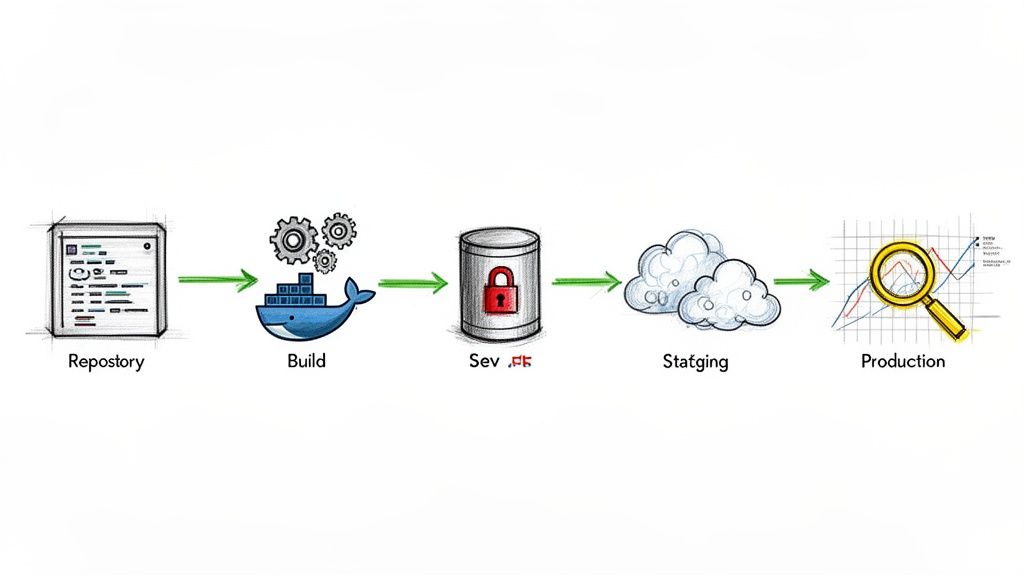
Jumping into YAML files without a plan is a classic mistake. A CI/CD pipeline is only as good as the underlying process it automates. If your current process is chaotic, automating it just gets you to a bad state, faster.
Before you write a single line of CI configuration, you must make deliberate, technical choices about how your team builds, tests, and deploys software. This initial planning isn't bureaucratic overhead; it’s the most critical phase. It dictates your security posture, scalability, and long-term maintenance burden.
The business impact is undeniable. The market for CI tools is set to explode from USD 2.58 billion to USD 12.66 billion by 2034. Why? Companies that master CI/CD report a 50% cut in delivery costs and a 68% boost in their security posture. This is a massive competitive advantage rooted in technical excellence.
Building Your CI/CD Pipeline Foundation
A robust pipeline starts with two non-negotiable technical prerequisites: a rigorous version control strategy and a logical repository structure. Let's dissect them.
Defining Your Version Control Strategy
Your VCS is the single source of truth. If it's messy, your pipeline will be unreliable and complex. The two dominant models you'll encounter are GitFlow and Trunk-Based Development (TBD).
GitFlow: This is a structured branching model using long-lived branches like
developandmain, plus temporaryfeature/*,release/*, andhotfix/*branches. It's well-suited for applications with scheduled release cycles and a need for strict change control. Your pipeline configuration will be more complex, with triggers for each branch type (e.g., merge todeveloptriggers a build for the dev environment, a newrelease/*branch triggers a build for staging).Trunk-Based Development (TBD): All developers commit directly to a single
main(ortrunk) branch. This model is essential for true Continuous Delivery, forcing small, frequent integrations. It simplifies pipeline logic (typically, one trigger onmain), but demands a comprehensive, high-quality automated testing suite to prevent a constantly brokenmain. Feature flags become critical for managing in-progress work.
Your choice here directly dictates your pipeline's trigger logic and complexity. GitFlow requires a more intricate pipeline with multiple conditional paths, whereas TBD leads to a linear, more frequently run pipeline.
Designing Your Repository Structure
Next: code organization. Do you use a single repository for all services (monorepo) or a separate repository for each service (polyrepo)?
A well-structured repository acts as a blueprint for your automation. If a human can't easily find and build the code, your pipeline will struggle too. Your repo layout is the physical foundation; if it's unstable, everything built on top is at risk.
For example, a monorepo simplifies dependency management and cross-service atomic commits. The technical challenge? Your CI configuration must be intelligent enough to detect which services have changed and only trigger builds for them. Tools like Bazel, Nx, or custom scripts using git diff can identify affected paths to avoid rebuilding everything on every commit.
A polyrepo simplifies the pipeline for each service but creates complexity in managing inter-service dependencies and coordinating releases. You might rely on package manager versioning or Git submodules, each with its own set of trade-offs.
There is no single right answer. Weigh the trade-offs based on your team's workflow and application architecture. This is a fundamental part of what makes up a complete deployment process, a concept that's crucial to get right. If you're still fuzzy on the details, check out our guide on what is a deployment pipeline to get the full picture.
Choosing Your CI/CD Tooling Strategy
Finally, you must decide where your CI/CD platform will execute. Will you manage it on-premises (self-hosted), or use a cloud-based SaaS solution? This decision is a trade-off between control, cost, and your team's operational capacity.
Here’s a quick technical comparison to inform your decision:
| Factor | Self-Hosted CI/CD (e.g., Jenkins, TeamCity) | SaaS CI/CD (e.g., GitLab CI, CircleCI, GitHub Actions) |
|---|---|---|
| Initial Setup & Maintenance | Requires significant upfront effort to provision, configure, and maintain servers. You are responsible for OS patching, security hardening, and managing agent capacity. | Minimal setup. The provider manages all infrastructure, maintenance, and updates. You configure your pipeline via YAML and connect your repository. |
| Control & Customization | Total control. Unrestricted access to the host machine allows for custom tool installation, complex networking, and integration with any internal system. | Less control. You operate within the provider's execution environment. Customization is possible via Docker images or pre-defined setup actions but is limited by the platform's API and features. |
| Cost Model | Primarily an operational cost (server hosting, engineering time). Open-source tools like Jenkins are "free" software, but commercial options like TeamCity have license fees on top of infrastructure costs. | Subscription-based, usually priced per user, per build minute, or by concurrency tier. Predictable, but can become expensive at scale. |
| Scalability | You are responsible for scaling your own build agents (e.g., using Kubernetes-based Jenkins agents or EC2 Spot Fleets). This requires significant engineering and capacity planning. | Scales automatically. The provider manages a large pool of build agents, allowing for high concurrency without you managing the underlying infrastructure. |
| Security | Your security team has full control over the environment, a requirement for highly regulated industries. You are also fully responsible for securing every layer of the stack. | Security is a shared responsibility. The provider secures the platform, but you are responsible for securing your pipeline configuration, code, and secrets. |
| Best For | Teams with specific security/compliance needs, complex legacy integrations, or a dedicated platform engineering team to manage the infrastructure. | Teams that want to maximize velocity, minimize operational overhead, and leverage a managed, scalable platform. Most startups and cloud-native companies start here. |
Choosing between self-hosted and SaaS isn't just a technical decision; it's a strategic one. If your team is small and focused on product delivery, a SaaS solution like GitHub Actions or CircleCI is almost always the right call. If you're in a heavily regulated industry or have a dedicated platform team, a self-hosted option might provide the necessary control.
Turning Raw Code Into Deployable Artifacts
You’ve established the strategy. Now, we move to implementation: building the Continuous Integration (CI) part of the pipeline. This is the automated factory floor where your team's source code is compiled, validated, and packaged into a verified, shippable unit known as an artifact.
The objective is a consistent, repeatable, and idempotent process. Every commit should trigger this machine to reliably build, test, and package your application.
This entire automated workflow is defined as code within your repository. You’ll see it as a .gitlab-ci.yml file for GitLab CI, a Jenkinsfile for Jenkins, or a workflow file like main.yml in the .github/workflows directory for GitHub Actions. We call this "pipeline as code," and it’s the bedrock of modern CI/CD pipeline implementation. It makes your automation version-controlled, auditable, and transparent.
Crafting the Initial CI Pipeline Configuration
Let’s sketch out the core stages of a typical CI pipeline. The specific YAML syntax varies between tools, but the fundamental logic is universal. Think of it as a directed acyclic graph (DAG) of jobs—each stage must complete successfully before the next can begin.
This flow is a simple, powerful loop: a code change triggers a sequence of configured steps, all wrapped in a layer of security checks.

As you can see, it's a continuous loop. We code, we configure the pipeline to handle that code, and we secure the output, over and over again.
The Build Stage: From Source Code to Executable
The build stage transforms source code into a runnable component. For a Java application, this involves a build tool like Maven or Gradle. The pipeline job executes a command like mvn clean package -DskipTests, which compiles sources, processes resources, and packages them into a .jar or .war file.
For a Node.js application, you'd use npm or yarn. A typical job would run npm ci (which is faster and more reliable for CI than npm install) to get dependencies, then npm run build to transpile TypeScript, bundle assets with Webpack, or perform other build-time tasks.
One of the single biggest performance wins is dependency caching. Downloading dependencies on every run is a massive waste of time and network bandwidth. Every modern CI tool provides a caching mechanism. Caching
~/.m2for Maven ornode_modulesfor Node.js can slash build times by more than 50%.
Today, building the code is often just the first step. Most applications are then packaged into Docker images. This stage would also include a docker build command, using a multi-stage Dockerfile to produce a lean, optimized final image.
The Test Stage: The All-Important Quality Gate
Once built, we must verify correctness. The test stage is a multi-layered quality gate.
- Unit Tests: Fast, isolated tests of individual functions or classes. These should be run first, as they provide the quickest feedback. Command:
mvn testornpm test. - Integration Tests: Verify interactions between components. These are more complex, often requiring services like a database or message queue. Docker Compose or Testcontainers are excellent tools for spinning up these dependencies ephemerally within the CI job.
- Static Analysis (Linting): Tools like ESLint for JavaScript or SonarQube for Java are invaluable. They analyze source code for bugs, code smells, and security vulnerabilities without executing it. This is a cheap and effective way to enforce code quality and find issues early.
A crucial artifact from this stage is the test report. Most frameworks can generate reports in standard formats like JUnit XML. Configure your CI tool to parse these reports. This provides a detailed summary in the UI and, most importantly, allows the pipeline to automatically fail the build if any test fails.
Mastering Build Artifacts: The Final, Deployable Package
A successful CI run produces the build artifact: a single, versioned, self-contained package. This could be a .jar file, a zip archive, or, most commonly, a Docker image tagged with a unique identifier.
This artifact must be stored in a centralized, reliable repository.
- For Docker images: Push to a container registry like Docker Hub, Amazon ECR, or Google Artifact Registry.
- For other packages: Use an artifact repository manager like Nexus Repository or JFrog Artifactory.
The final job in the CI pipeline will tag the artifact immutably (e.g., with the Git commit SHA) and push it to the appropriate repository. This guarantees that every successful build produces a traceable, deployable unit, ready for the Continuous Delivery stages.
Automating Deployments with Advanced Delivery Strategies

Your tested artifact sits in a registry. Now, we automate its delivery to users. This is Continuous Delivery (CD), which orchestrates the path from registry to production. The goal is not just deployment, but safe, zero-downtime deployment with a deterministic rollback plan.
Typically, you define deployment stages for each environment: development, staging, and production. Deployment to development can be fully automated, triggering on every successful main-branch build. However, for staging and especially production, a manual approval gate is a critical control. This is a deliberate pause where an authorized user must explicitly approve the promotion to the next environment.
It's no surprise the Continuous Delivery market is booming, projected to grow from USD 5.68 billion to USD 20.17 billion by 2035. Cloud-native technologies make these advanced strategies more accessible than ever. If you're interested in the market forces, you can find more about CI/CD market trends on kellton.com.
Minimizing Risk with Progressive Delivery
A "recreate" deployment (terminating old instances, starting new ones) is high-risk. A single bug can cause a complete outage. We can do better. Modern pipelines use progressive delivery to limit the blast radius of a faulty deployment.
The core principle of progressive delivery is to expose a new version to a subset of traffic first. If metrics indicate a problem, the impact is contained, and rollback is instantaneous, often before the majority of users are affected.
Let's break down the most popular strategies.
When deciding which deployment strategy to use, you must balance speed, safety, and operational complexity. Each approach has its place, and the optimal choice depends on your application architecture and risk tolerance.
Progressive Delivery Strategy Comparison
Here’s a quick technical breakdown of these modern deployment strategies to help you choose the right approach for your team.
| Strategy | How It Works | Best For | Key Benefit |
|---|---|---|---|
| Blue-Green | Maintain two identical production stacks (Blue/Green). Deploy new version to the inactive stack (Green), run tests, then switch the router/load balancer to point all traffic to Green. | Critical applications needing zero downtime and instant rollback. | Instant, low-risk rollback by simply switching the router back to the Blue stack. |
| Canary | Route a small percentage of traffic (e.g., 1%-5%) to the new version (the Canary). Monitor key metrics (error rate, latency). Gradually increase traffic if metrics remain healthy. | Applications with good observability and a large user base to provide statistically significant feedback. | Real-world validation with limited user impact if issues arise. Automated analysis of metrics is key. |
| Feature Flagging | Deploy new code to production with the feature disabled by a flag. Enable the feature for specific user segments (e.g., internal users, beta testers) via a control plane, independent of code deployment. | Decoupling code deployment from feature release; A/B testing; "testing in production" safely. | Ultimate control over feature exposure. Enables instant "off" switch for a problematic feature without a full rollback. |
These strategies offer a massive improvement over traditional deployments, but they introduce complexity. If you're running on Kubernetes, we've got a deeper dive into these patterns in our guide on Kubernetes deployment strategies.
Managing Environment-Specific Configurations
A classic CD challenge is managing configuration that varies between environments (e.g., database URLs, API keys). Hardcoding these values into your artifact is a critical anti-pattern; it makes the artifact non-portable and creates a massive security risk.
Externalize your configuration. Here are the standard methods:
- Environment Variables: The simplest approach, conforming to Twelve-Factor App principles. The pipeline injects environment-specific values into the container's runtime environment at startup.
- Configuration Files: Package environment-agnostic config files in your artifact. At deploy time, the pipeline mounts environment-specific files (e.g.,
config.prod.json) into the container or uses a templating tool to generate the final config. - Secrets Management Tools: For sensitive data like passwords, tokens, and private keys, using a dedicated secrets manager is non-negotiable. Tools like HashiCorp Vault or AWS Secrets Manager are designed for this. The pipeline authenticates to the secrets manager and injects secrets securely at runtime.
Effective automation is key to fast, reliable delivery. If you want to push your testing automation even further, it's worth exploring how Robotic Process Automation in Testing can handle repetitive UI tests and other manual tasks inside your pipeline.
Automating Infrastructure with IaC
A mature CD pipeline manages not only the application but also the underlying infrastructure. This is the domain of Infrastructure as Code (IaC). Using tools like Terraform or Pulumi, you define your servers, networks, load balancers, and databases in version-controlled code.
By integrating IaC into your CD pipeline, you can create a powerful, unified workflow. A pipeline stage can execute terraform apply to provision or update infrastructure before the application deployment stage runs. This guarantees that your application and its infrastructure are always in sync, providing reproducible environments from development to production.
Weaving Security and Observability Into Your Pipeline

A CI/CD pipeline implementation that only focuses on speed is a liability. Without security and observability baked in from the start, you're not building a delivery machine; you're building a high-speed vulnerability injector.
The "shift-left" philosophy means integrating security and monitoring as automated, early-stage checks, not as manual, late-stage gates. This makes security a shared, continuous practice, not a bottleneck.
Catching Vulnerabilities Before They Ship
The most effective starting point is embedding automated security scanning directly into your CI stages. These jobs run on every commit, providing developers with immediate feedback. It is infinitely cheaper to fix a vulnerability found minutes after a commit than one discovered in production weeks later.
These are the essential security gates for any modern pipeline:
- Static Application Security Testing (SAST): SAST tools analyze raw source code to find security flaws like SQL injection, insecure deserialization, and weak cryptographic functions. They run before the code is even compiled.
- Software Composition Analysis (SCA): Your application depends on hundreds of open-source libraries. SCA tools scan your dependency manifest (
pom.xml,package-lock.json) to identify libraries with known vulnerabilities (CVEs) and to enforce license policies. - Container Scanning: If you're building Docker images, you must scan them. These scanners inspect every layer of the image, from the base OS up to your application, for known vulnerabilities and insecure configurations.
Configure your pipeline to fail the build if these tools discover high-severity vulnerabilities. For a much deeper dive, this complete guide to CI/CD security is an excellent resource. It is always better to break a build than to break production.
Knowing What's Happening After You Deploy
A deployment isn't "done" when kubectl apply returns success. It's done when you have verified its behavior in production. This is observability: instrumenting your systems to provide the raw telemetry needed to understand their state.
Your pipeline's responsibility extends to ensuring the application ships with proper instrumentation. Focus on the three pillars of observability:
- Metrics: Time-series numerical data (e.g., latency, error rates, CPU utilization). Your pipeline itself should emit metrics like build duration and success rate to a monitoring system like Prometheus.
- Logs: Timestamped records of events. Applications should generate structured (e.g., JSON) logs that can be aggregated in a centralized platform like the ELK Stack.
- Traces: A trace follows a single request's journey through a distributed system. Instrumenting your code with libraries that support OpenTelemetry and sending data to a tracer like Jaeger is crucial for debugging microservices.
Getting these tools in place is the first step. To take it further, we wrote a whole article on how to build your own open-source observability platform.
When you instrument your pipeline and apps, you turn them from black boxes into transparent systems. The moment a build slows down or a deployment goes sideways, you have the data to pinpoint why. Every incident becomes a learning opportunity backed by data.
Building a Self-Healing Pipeline
The apex of a mature CD practice is a pipeline that not only detects problems but automatically remediates them. By connecting your observability data back to your deployment process, you can create automated rollbacks.
Here’s the technical implementation: After a deployment (e.g., a canary), the pipeline enters a "monitoring" phase. A job queries your monitoring system's API to check key Service-Level Indicators (SLIs) against their Service-Level Objectives (SLOs). For example: "Is the p95 latency below 200ms? Is the error rate below 0.1%?"
If these KPIs are breached, the pipeline automatically triggers a rollback action—for a canary, this means shifting 100% of traffic back to the stable version. This automated safety net minimizes mean time to recovery (MTTR) and makes your entire CI/CD pipeline implementation radically more resilient.
Here’s how we can help you build your CI/CD pipeline.
Look, even with a great guide, going from a DevOps dream to a working pipeline is a huge technical lift. It takes a ton of expertise and a lot of focused work. This is exactly where having the right partner can completely change the game, taking the risk out of the project and getting you to the finish line much faster.
That's why OpsMoon exists.
We kick off every conversation with a free work planning session. And no, this isn't a thinly veiled sales call. It's a real, collaborative meeting where we'll dive into your current setup, figure out your DevOps maturity, and build a clear, actionable roadmap for your CI/CD pipeline together.
Getting The Right Engineers for the Job
Once you have a solid plan, the real challenge begins: finding the right people to execute it.
Let's be honest, hiring engineers who are true masters of modern DevOps—from Kubernetes and Terraform to pipeline security—is incredibly tough. The good ones are hard to find and even harder to hire.
Our Experts Matcher technology is our answer to this problem. It connects you with engineers from the top 0.7% of the global talent pool. This means you get the exact skills you need for your project, without the months-long, expensive slog of a traditional hiring process.
We believe that getting access to elite engineering talent shouldn't be a roadblock to building great products. We've built a network of proven experts so you can build resilient, scalable pipelines with total confidence, knowing the job is getting done right from day one.
We've also designed our engagements to be flexible, so you get exactly what you need.
- End-to-End Project Delivery: Just hand the whole project over to us. We’ll take it from start to finish and deliver a production-ready pipeline.
- Hourly Capacity Extension: Need to beef up your current team? We can provide specialized engineers to work right alongside your own, filling in skill gaps and pushing your project forward.
When you work with OpsMoon, you also get free architect hours, real-time progress updates through shared dashboards, and a partner who’s committed to getting it right. We take on the heavy lifting of building and maintaining your CI/CD pipelines. This frees up your team to do what they're best at: shipping awesome code and delivering value to your customers.
If you want to accelerate your DevOps journey, we're here to help.
Even with a detailed roadmap, you're bound to have questions. In my experience, the same handful of queries pop up whenever an engineering team starts building out their CI/CD capabilities.
Let's tackle them head-on.
What's the Real First Step in a CI/CD Pipeline Implementation?
Everyone wants to jump straight to the flashy automation tools, but that's a mistake. The real first step—the one that makes or breaks everything that follows—is nailing your version control strategy and repository structure.
Before you write a single line of pipeline code, your team needs to be religious about a branching model, whether it's GitFlow or Trunk-Based Development. Your code repository has to be clean and organized, and you absolutely need a secure, defined process for managing the secrets and credentials your pipeline will eventually need.
Skipping this foundational work is a recipe for disaster. You'll end up with a chaotic, unmanageable pipeline that's impossible to scale and a nightmare to secure.
How Do You Pick the Right CI/CD Tools?
This isn't about finding the "best" tool, but the right tool for your team, your tech stack, and your long-term goals.
If you're already living in the GitLab or GitHub ecosystems, their built-in solutions (GitLab CI and GitHub Actions) are a fantastic, low-friction starting point. For more complex, multi-cloud, or hybrid setups, you might need the power and flexibility of a dedicated tool like Jenkins, CircleCI, or TeamCity.
Look at your primary cloud provider, where your source code lives, and whether your team is more comfortable with declarative YAML or scripted pipelines. The trend is clear: by 2026, an estimated 55% of developers worldwide will use CI/CD tools as a standard part of their workflow. High-performing teams are already pushing beyond basic pipelines, using staged deployments and AI to make their processes smarter and more resilient. You can read more about future-proofing your CI/CD toolchain on blog.jetbrains.com.
How Can You Make Sure Your CI/CD Pipeline Is Secure?
Security can't be an afterthought; it has to be baked in from the very beginning. This is what people mean when they talk about "Shift-Left."
Start with the pipeline itself. It's a high-value target, so lock it down. Enforce the principle of least privilege for every action it takes and use a dedicated secrets manager like HashiCorp Vault to handle credentials.
A pipeline is a high-value target. Treat its security with the same rigor you apply to your production applications. A compromised pipeline can give an attacker the keys to your entire kingdom.
Next, build security checks directly into your pipeline stages. You need to be scanning at every step of the way.
- SAST (Static Application Security Testing): To scan your source code for vulnerabilities before it's even compiled.
- SCA (Software Composition Analysis): To vet all your third-party dependencies for known security holes.
- Container Scanning: To check your Docker images for vulnerabilities, starting from the base layer.
Finally, once you have a deployable artifact, run DAST (Dynamic Application Security Testing) against a staging environment. This helps you find runtime vulnerabilities before they ever have a chance to hit production.
Navigating the complexities of CI/CD can be challenging, but you don't have to do it alone. OpsMoon provides the expertise and resources to accelerate your DevOps journey, connecting you with top-tier engineers to build, secure, and manage your pipelines effectively. Let us handle the heavy lifting so you can focus on innovation. Learn more at https://opsmoon.com.
Leave a Reply